 Scrollify
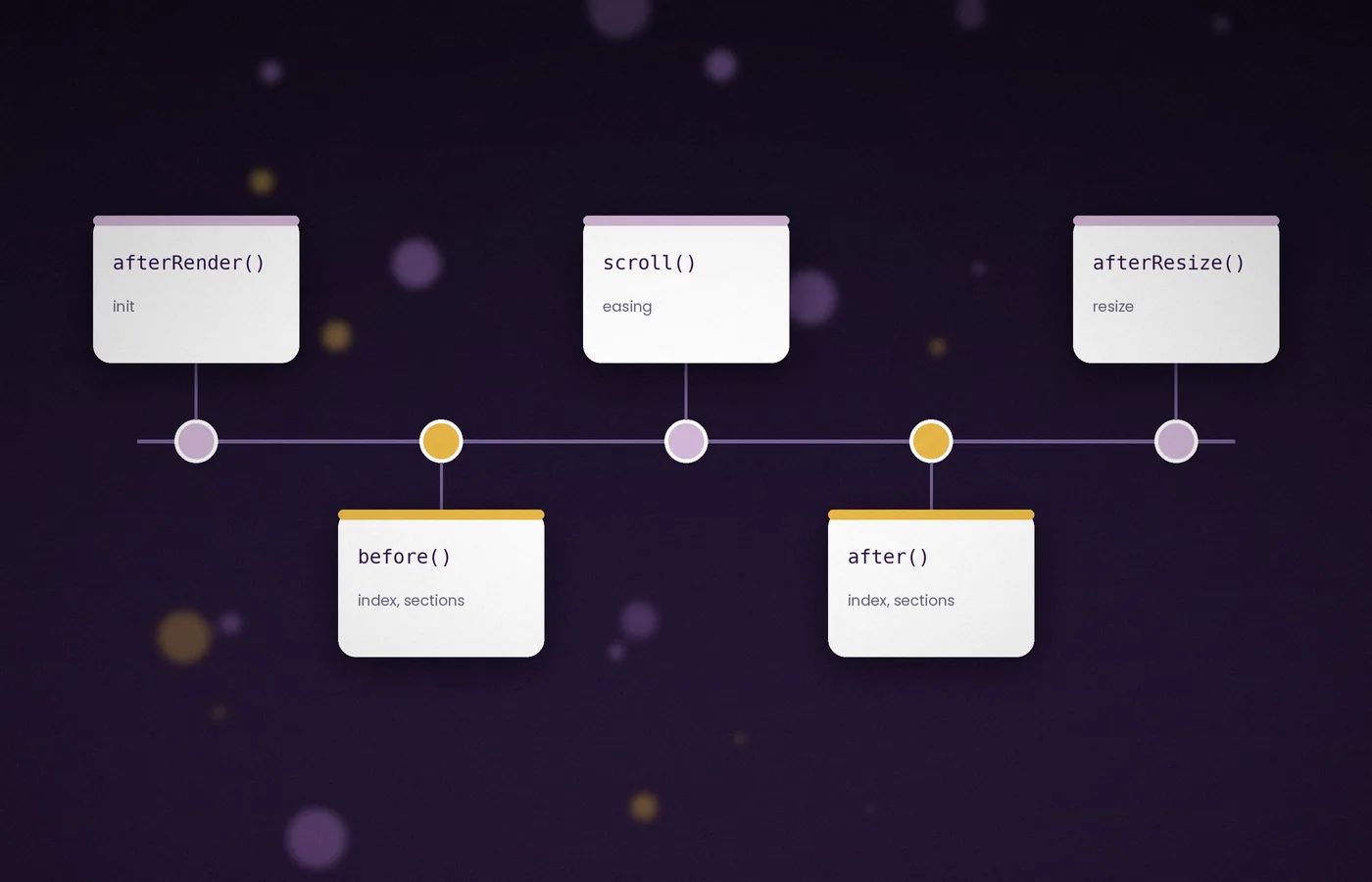
Callbacks let your own code run at precise points in a Scrollify transition. They are the key to animations, active menu states and on-demand content.
The plugin provides four: afterRender, before, after and afterResize.
The order of events
- afterRender fires once, after the plugin has measured the page.
- before fires when a transition is about to begin.
- The page animates to the target section.
- after fires once the new section has settled.
- afterResize fires whenever the window is resized.
The before callback
This function receives the index of the target section and an array of all sections as jQuery objects.
before: function (index, sections) {
  sections[index].addClass("is-entering");
}
Use it to start exit animations or to prepare the incoming panel. Keep the work light, because heavy code here delays the scroll.
The after callback
This runs when the new section is fully in view, which makes it the right place for entrance animations and analytics.
after: function (index, sections) {
  sections.forEach(function (s) { s.removeClass("is-active"); });
  sections[index].addClass("is-active");
}
Pair the class with CSS transitions to fade in headings or slide in images.
.panel h2 { opacity: 0; transform: translateY(24px); transition: .6s; }
.panel.is-active h2 { opacity: 1; transform: none; }
The afterRender callback
This fires once, immediately after initialisation. It is useful for marking the first panel as active or revealing a page that was hidden while loading.
afterRender: function () {
  $.scrollify.current().addClass("is-active");
  $("body").addClass("ready");
}
The afterResize callback
Scrollify recalculates section heights when the window changes size. Use afterResize to refresh anything that depends on those dimensions, such as canvas elements or charts.
afterResize: function () {
  myChart.resize();
}
Practical uses
Updating a progress indicator
after: function (index, sections) {
  var pct = sections.length > 1
    ? (index / (sections.length - 1)) * 100 : 100;
  $(".progress").css("width", pct + "%");
}
Loading media on demand
Videos and large images can wait until their panel is reached. Swap a data-src attribute into src inside before, so loading starts while the animation runs.
Recording section views
If you use analytics, send an event from after. Sending it from before would also count panels that a visitor skipped past quickly.
Common pitfalls
- Do not call
$.scrollify.move()insidebefore; it creates competing animations. - Remember that the index starts at zero, so the first panel is index 0.
- Callbacks also fire for interstitial sections, so check the element before applying panel-only styles.
Decide what each callback owns
Callbacks become easier to reason about when each has a narrow responsibility. Use a preparation step for inexpensive visual state, a completed-transition step for the settled panel, and a resize step for genuinely dimension-dependent work. Do not place every interaction in one large function merely because it already receives the section index. Split menu updates, media handling, and reporting into named helpers that can be read independently. The callback should describe the sequence at a glance. When an effect later behaves unexpectedly, you can inspect its helper without also having to understand unrelated analytics and navigation code in the same block.
Initialise the actual current section
The initial visible panel may come from a shared hash link rather than the first element in the document. Marking the first panel active unconditionally creates a mismatch between the visible destination and its visual state. After the plugin is ready, read its current section and apply the same active-state helper used after movement. Test this with a fresh direct link to a middle panel, since a normal homepage load can hide the mistake. Keep the content visible before that state is applied. An initial animation should add polish, while a delayed or failed script should still leave the page readable.
Keep preparation work off the critical path
The before callback executes at a sensitive point in navigation. Synchronous work such as processing a large data set, repeatedly measuring the document, or building a complex chart can delay the first animation frame. Prepare expensive resources earlier or load them asynchronously with a clear placeholder. A class change, a small attribute update, or a request that does not block rendering is usually easier to combine with smooth movement. Measure an actual slow device when assessing performance. A callback that feels immediate on a powerful laptop may still interrupt the transition when a phone is busy decoding images or handling another task.
Make active states reversible
A visitor can move forward, reverse direction, and revisit the same panel many times. An entrance effect must therefore define what happens on departure and on a second arrival. Remove the previous active class consistently, then set the new one on the destination. If an animation should play only once, track that decision explicitly with a separate class or data value rather than letting a forgotten cleanup step determine the outcome. Keep the distinction between currently active and previously visited. Those states answer different questions and can both be useful for presentation, but combining them produces confusing behaviour after a few transitions.
Avoid re-entrant movement
A callback triggered by movement should not casually start another movement. Calling move from before or after can create a chain of transitions whose final destination depends on timing rather than the user's action. If a business rule blocks entry to a panel, model that rule directly and provide a visible explanation or alternative control. The implementation allows before to return false to cancel a transition; use such control deliberately and test how navigation recovers. Never make the only route out of a blocked state another automatic transition. A visitor must retain a predictable way to continue, go back, or leave the page.
Load asynchronous content with a stable placeholder
Starting a request in before does not mean the result will arrive before the transition finishes. Display a useful loading state, handle errors, and check that the panel still exists when the response arrives. A visitor may already have moved elsewhere or an application may have removed the view. If the inserted content changes its panel's dimensions, refresh the layout after insertion rather than assuming the original measurements remain valid. Reserve space for large media wherever practical. Loading content should not silently move the next destination or make the current heading jump under a fixed navigation bar.
Define a meaningful section view
An after callback tells you that a transition has completed; it does not prove that a person read the content. If you report section views, define the event precisely and avoid representing a completed animation as a stronger engagement claim. Decide whether repeated visits should be counted and whether the initial panel should generate the same event. Keep any reporting optional and subject to the site's actual consent requirements. When testing, use a visible console message or a local stub before connecting a reporting service. That makes duplicate events easier to spot without sending misleading data into a live account.
Treat media playback as a separate interaction
Entering a section is not permission to assume that audio or video will autoplay. Browsers apply their own playback policies, and visitors may prefer a still image or reduced motion. Provide a visible play control and a useful poster image. If a callback starts playback, handle the returned promise and show a usable fallback when playback is rejected. Pause media when the section is no longer relevant, but avoid resetting progress unexpectedly if the design allows revisiting it. Keep captions and essential explanatory text available independently of the visual effect so the section remains understandable without automatic playback.
Handle progress indicators safely
A progress bar based on section index needs a clear definition. Dividing by the number of transitions works for several sections, but a single-section page creates a zero denominator. Guard that case and decide whether interstitial blocks belong in the count. A footer included in navigation may not be a numbered chapter in the story. Give the indicator an understandable label and avoid announcing every animation frame to assistive technology. Update it at a sensible transition boundary. The aim is to orient a reader, not to create a constantly changing status message that competes with the actual page content.
Keep resize callbacks bounded
A resize can happen repeatedly while someone drags a window edge or while mobile browser controls change. Restrict afterResize to work that genuinely depends on the new dimensions. If a chart library offers a resize method, call it without also rebuilding its entire data model. Avoid calling update unconditionally from a callback whose surrounding lifecycle already performs an update, since that can create redundant work or an accidental loop. Log the order of events in a minimal page if you are unsure. An observed sequence is much more useful than assuming that every callback fires exactly once under every navigation condition.
Clean up application-owned resources
Destroying Scrollify removes its own behaviour, but it does not automatically remove everything your callbacks created. Timers, observers, custom menu listeners, media handlers, and outstanding requests belong to your application. Give the page a matching cleanup function that cancels or disconnects them when the view is removed. On remount, attach each handler once and initialise fresh state. Test leaving and returning to the view several times, because duplicate effects often appear only after the second visit. A reliable callback integration has a clear beginning and end, with resources owned by the component that created them.
Frequently asked questions
Should I use before or after for the menu?
Use the moment that matches the meaning of your active state. Before can show the destination during movement; after can represent the settled panel. Whichever you choose, initialise the state on direct page loads as well and remove stale state from the previous destination.
Why does the first panel have the wrong animation?
Check whether the page opened with a hash and whether your initialisation always selects the first element. Apply active styling to the actual current section. Also confirm that essential text is visible before callback code runs, so a delayed script does not hide the page.
Can a callback wait for a remote request?
Starting a request does not make the scrolling lifecycle wait automatically. Use a placeholder, handle success and failure separately, and refresh measurements if content changes height. Check that the view still exists before inserting a result that arrives after the visitor has left.
Why do my effects run twice after returning to a view?
Look for application listeners or timers attached again during remount. Cleaning up the plugin is only part of the lifecycle. Remove your own handlers, cancel obsolete work, and ensure the next mount attaches one fresh set of resources.
Conclusion
Give each callback a clear job and keep transition-time work small. Initialise the actual current section, handle asynchronous content deliberately, and clean up resources when the view ends. Reliable callbacks coordinate the presentation while preserving readable content, predictable navigation, and a lifecycle another developer can understand.